This post is about one practical skill: being able to find any photo you have ever taken in about 30 seconds, using nothing more than a simple folder structure and a file-naming convention.
Here is a real path from my own Pictures folder, a sunrise at Mount Errigal in Ireland:
04_Landscape/2024-09-16_0600_ErrigalSunrise/TJW_1583.NEFBy the end of this post you will be able to read it at a glance: what kind of photo it is, when and where it was taken, which camera took it, and which frame it is.
A word before you start. This is the system I use, not a set of rules. Pick out the ideas, concepts and structures that suit the way you work and apply those. And if you manage your photos in Lightroom or Photoshop, be aware that this folder-first approach doesn’t translate well to Lightroom’s catalogue and collection structure. Your time is better spent on the tags and keywords covered at the end of this post.
The problem: sound familiar?
Most of us have a Pictures folder that looks something like this:
Desktop / Pictures
  IMG_4827.JPG
  IMG_4827 (1).JPG
  DSC_0042.NEF
  New folder (3)
  Photos from Mom's phone
  final_FINAL_edit2.jpg
  Untitled-1.tif
  Sept trip GOOD ONES
There are three root causes:
- Cameras recycle numbers. Most cameras count from IMG_0001 to IMG_9999 and then start again, so after a few years you have several different photos called IMG_4827.
- Two cameras, same names. A second body or a phone produces identical names. Copy both cards into one folder and your computer asks whether to replace a file. Say yes by accident and a picture is gone.
- Memory fades, dates don’t. “That heron shot from a few summers ago” is hard to find. A date and a place in the name make it easy.
The fix: let the folders encode what, when and where, and let the file name encode the camera, the sequence and a unique identifier.
Naming principles: consistent, concise and contracted
Every folder and file name in this system follows three rules:
- Consistent. Same pattern, every shoot, every camera. A simple rule you always follow beats a clever one you sometimes forget, and it has to be easy enough to do after a long day of shooting.
- Concise. Only what you need to find the photo again. Roughly 60 characters or fewer.
- Contracted. No spaces. Words run together, with the first letter of each word capitalised so a descriptive title stays easy to read: ErrigalSunrise, BoatsOfMagheroaty. Short, obvious abbreviations are fine too, like IR for infrared or Ex for export.
Two supporting rules make the whole thing work:
- Chronological. Inside each category, folders start with the date, written YYYY-MM-DD. Your computer then sorts them in order for you.
- Computer-safe. No symbols. Underscores separate the parts of a name. Spaces and symbols cause trouble on websites, in email, and when moving files between Mac and Windows.
Level 1: numbered categories
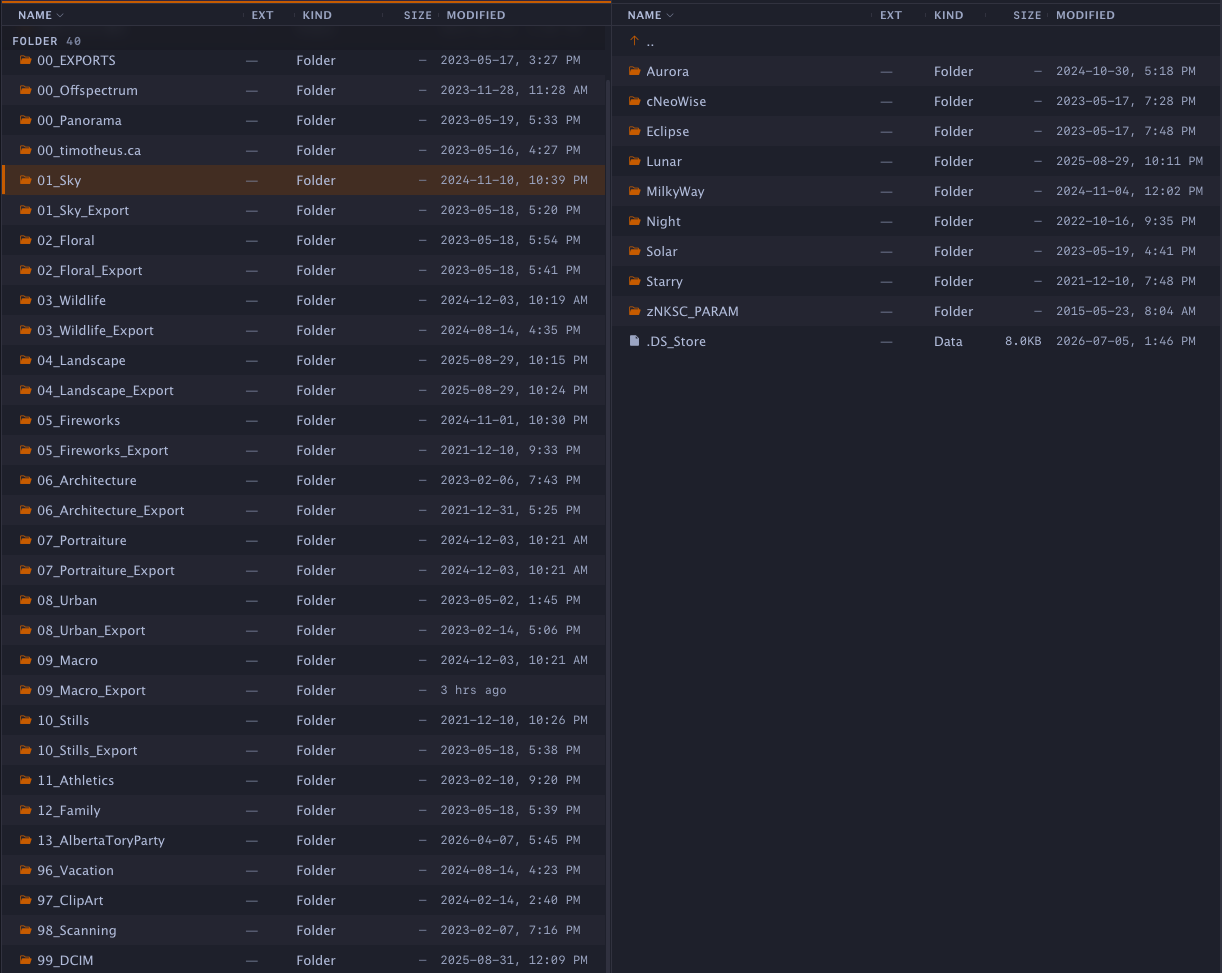
The top level of my library is a list of categories, each with a two-digit number in front. Without the numbers your computer sorts alphabetically, so Fireworks would land above Sky. The number puts them in the order I want.
00 · Working & delivery
  00_EXPORTS
  00_Offspectrum
  00_Panorama
  00_timotheus.ca

01–12 · Genres
  01_Sky
  02_Floral
  03_Wildlife
  04_Landscape
  05_Fireworks
  06_Architecture
  07_Portraiture
  08_Urban
  09_Macro
  10_Stills
  11_Athletics
  12_Family

13 · Projects
  13_AlbertaToryParty

96–99 · Special
  96_Vacation
  97_ClipArt
  98_Scanning
  99_DCIM
- Number ranges have meaning. 00 is for working and delivery folders (finished exports, panoramas in progress, images for this website), so they sit at the top. 01–12 are the genres I shoot. The 90s are special collections that aren’t really genres, such as vacations, clip art, scans of old prints and my memory-card archive, and they sink to the bottom.
- Leave gaps. 14 to 95 are still open, so a new category slots in without renaming anything. When I needed a dedicated home for one organization’s photos, 13_AlbertaToryParty simply went next in line.
- Export twins. In my library every genre has an _Export twin, such as 04_Landscape next to 04_Landscape_Export: raw originals on one side, finished JPEGs and TIFFs on the other. That said, with good tags and your editor’s filters you will most likely not need a duplicate export folder for every genre. Do consider a separate export folder for each distinct project.
- A card archive at the bottom. 99_DCIM holds complete copies of my memory cards: once a card is nearly full, I copy its entire contents into this folder as an archive, exactly as the camera wrote them.
If you are just starting out, five to eight categories is plenty.
Level 2: one folder per shoot, date first
Inside each category there is one folder per shoot. The name is the date the shoot started, an underscore, then the place, contracted with capital letters and no spaces:
2025-09-27_WatertonWhen I shoot several places in one day, I add the 24-hour time after the date:
2024-09-16_0600_ErrigalSunriseHere is part of a trip to Donegal, Ireland. The list reads like a diary: sunrise at Errigal at six, the reflection at seven, the path at ten past eight, the beach in the afternoon. I did nothing to sort it; the names do it.
04_Landscape/  (Ireland, Sept 2024)
  2024-09-15_0600_Dunlewey
  2024-09-15_0800_GweedoreBay
  2024-09-15_1630_BoatsOfMagheroaty
  2024-09-15_1900_BloodyForeland
  2024-09-16_0600_ErrigalSunrise
  2024-09-16_0700_ErrigalReflection
  2024-09-16_0810_ErrigalPathway
  2024-09-16_1500_MagheraBeach
  2024-09-16_1700_AnPort
Why year first? Written 09-27-2025, dates sort out of order: month-first puts January 2026 ahead of March 2025. Written 2025-09-27, they always run oldest to newest, and nobody wonders whether 03-02 is March or February. Variations stay in the same pattern; my infrared shoots add IR, as in 2025-02-22_Elkwater-IR.
A shoot that spans two categories? Create a folder in each: one for the landscapes and another for the wildlife, with the same date and the same location descriptor in both. This is also a good moment to start thinking about how tags could handle the overlap for you.
Going deeper: subject subfolders
Subjects normally belong in keywords, not folders. My 01_Sky category is the exception that proves the rule. Inside it there is a subfolder for each kind of sky subject:
01_Sky/
  Aurora/
  cNeoWise/      ← comet NEOWISE
  Eclipse/
  Lunar/
  MilkyWay/
  Night/
  Solar/
  Starry/
  zNKSC_PARAM/   ← z sorts it last

01_Sky_Export/
  AuroraEx/  LunarEx/  …
These subjects never overlap: a photo is an aurora or an eclipse, never both. They also need different gear and techniques, and some I shoot only once every few years, so each gets its own drawer. The export side mirrors it, so every finished image still traces straight back to its source.
Two small tricks: the lowercase c in cNeoWise marks a comet, and zNKSC_PARAM is a settings folder that Nikon’s NX Studio creates for its edits. Putting a z in front pushes it to the bottom of the list, out of the way.
My advice: start with categories and dated shoot folders. Only add a subject level when a genre really splits into separate subjects like this.
File names: every photo answers five questions
Here is how the folders and the file name work together. Read the full path left to right and it answers five questions:
04_Landscape/2024-09-16_0600_ErrigalSunrise/TJW_1583.NEF| Question | Answered by | In this example |
|---|---|---|
| What kind? | The category folder | 04_Landscape |
| When? | The shoot folder: date, plus time if needed | 16 September 2024, 6:00 a.m. |
| Where? | The shoot folder: the place, contracted | ErrigalSunrise |
| Which camera? | The file prefix, set once in the camera’s menu | TJW (my Nikon D850) |
| Which frame? | The camera’s own counter (never edit it) | 1583 |
I never type the first three into a file, because the folders already carry them. The prefix and counter come straight from the camera. Together they identify the camera and the sequence, and within a shoot folder they make every file name unique.
Set the prefix to identify the camera
Most Nikon, Canon and Sony bodies let you replace the DSC or IMG at the start of the file name with your own characters; look for File naming or File name in the setup menu. Your initials are a good start, but the prefix really identifies the camera, not just you. If you own two bodies, don’t give both your initials. Sony, for example, makes several versions of the A7R and A7S; if you own both, work the model into the prefix too, so you can tell the two bodies apart at a glance.
I shoot with a Nikon D850 and a D610. The D850 uses my initials, TJW. The D610 is a full-spectrum conversion, so it uses IFR. One look at a file name tells me which camera made it.
A distinct prefix also helps whenever photos are pooled, for example a slideshow from a group outing: everyone knows instantly whose photo is whose.
Exports: a matching folder ending in Ex, and a suffix
Edited images never go back into the raw folder. They go into the export folder, inside a shoot folder with the same name plus Ex on the end. Every subfolder on the export side follows this rule, from ErrigalSunriseEx to AuroraEx. Folder and path names are often severely truncated in export dialogs, and that little Ex lets me confirm at a glance that I am saving into the right place. From any JPEG I can still walk straight back to its raw file.

04_Landscape/
  2024-09-16_0600_ErrigalSunrise/
    TJW_1594.NEF

04_Landscape_Export/
  2024-09-16_0600_ErrigalSunriseEx/
    TJW_1594.JPG   TJW_1594-1.JPG
The export keeps its original name plus a short suffix that says what the copy is for. Pick a small set and reuse them, and avoid “final”: there is always another final.
| Suffix | Meaning |
|---|---|
| _DxO | Processed in DxO PhotoLab (its default suffix) |
| -1, -2 | Alternate versions of the same frame |
| _cell | Sized for phones and sharing |
| _5x7-300dpi | Print size and resolution |
As mentioned above, well-applied tags and filters may make a full set of duplicate export folders unnecessary. A separate export folder per project is still worth having.
Leaving home? Give it the full name. Once an exported file leaves its folder (emailed to a client, posted to a shared folder, collected for a group slideshow), TJW_1594 alone no longer says where or when, and the same number will come round again after 9999. For those copies, put the date and place in front. Most export dialogs can do this automatically:
2024-09-16_ErrigalSunrise_TJW_1594_cell.jpgCompetitions often specify their own naming, such as title plus member number. Follow their rules exactly.
Rules of the road
| Do | Avoid |
|---|---|
| Underscores between parts; capitalise the first letter of each word inside a part | Spaces (they turn into %20 online, and some software cuts the name at the space) |
| Two-digit months and days: 09, not 9 | Symbols: / \ : * ? ” < > | # % & |
| Keep sidecars (.dop, .xmp) with their raw file | Accents and emoji |
| Set your camera prefix and clock before the shoot | Renaming raw files or their sidecars, ever |
| Keep names short, roughly under 60 characters | Words like final, final2, REAL-final |
Raw files and their sidecars are never renamed. They rely entirely on the context of the folder structure. DxO PhotoLab saves your edits in a small .dop file next to each raw file (Lightroom and others use .xmp), and the pair should always travel together under their original names. If one or many files are ever copied or moved and orphaned from their folder, the date and time in the EXIF data are enough to put them back into their original shoot folder.
And check the camera clock, especially after daylight saving time changes, because the dates in your folder names, and in that EXIF safety net, come from it.
The workflow: the same five steps every shoot
- Import. Create the dated shoot folder in the right category and import the card into it.
- Cull and tag. Delete the obvious rejects; add a few keywords and a star rating to the keepers. Subjects like “heron” or “barn” go in keywords, not extra folders.
- Back up, before you format the card. Until there are two copies, the card is your only copy.
- Edit. Modern editors never change the raw file; the edits live in the sidecar.
- Export into the matching Ex folder, with a suffix.
Notice there is no renaming step. The camera already writes its prefix and the folder carries the date and place, so the whole system costs me about ten seconds per shoot.
Let the camera and software do the typing
- Your camera: Setup menu › File naming / File name. Replace DSC or IMG with a prefix for that body. Set it once. (On Nikon it is in the Photo Shooting menu; check your manual for Canon and Sony.)
- DxO PhotoLab: in the export dialog, choose the matching Ex folder as the destination and a consistent suffix (default _DxO). Save it as an export preset.
- Phone photos: import them through your computer so they land in the same categories and dated folders.
- Lightroom and Photoshop: this system doesn’t work well with them. Dedicate your time to tags and keywords instead.
Protect it: the 3-2-1 backup rule
- 3 copies of every photo: the original plus two backups.
- 2 different kinds of storage, for example computer plus external drive.
- 1 copy somewhere else: the cloud, or a drive kept at a friend’s or the office. A fire or theft takes the computer and the external drive at the same time.
This is where the system pays off. Everything lives under one Pictures folder, so backing up is just mirroring one folder. I use SyncFolders Pro; Time Machine on a Mac or File History on Windows also work. It is also easy to spot-check that a dated shoot folder on the backup matches the one on your computer.
Getting started: don’t reorganise 20 years of photos this weekend
The most common mistake is trying to fix everything at once, getting overwhelmed, and giving up. Pick the ideas that suit you and start small.
- Start with your next shoot. Set up your categories and camera prefix now, then use them on your very next outing.
- Tidy this year. Move this year’s shoots into categories and dated folders. Move each raw file together with its sidecar, and don’t rename either.
- Work backwards, one year at a time, when you have a rainy afternoon. Old folders can keep their names until then.
Your checklist:
- Set a file prefix for each camera body
- Check the camera’s date and time
- Create three to six numbered categories
- Save an export preset with a suffix
Common questions
What about photos with no date? For scans and old prints, use the best known date, such as 1987-07, and add a keyword like date-estimated.
What if a shoot fits two categories? Create separate folders in each category, with the same date and the same location descriptor. Then start thinking about how tags can address the overlap.
Will renaming lose my edits? Never rename raw images or sidecar files.
I use Lightroom or Photoshop. Should I adopt this? Not as a whole. This system does not work well with Lightroom’s catalogue structure. It is best to dedicate your time to tags and keywords.
Do I need special software? No. It works with any editor that browses your folders directly, or with just folders.
Summary: the one-page cheat sheet
Everything above, on one page. Every photo answers five questions:
04_Landscape/2024-09-16_0600_ErrigalSunrise/TJW_1583.NEF| What kind? | When? | Where? | Which camera? | Which frame? |
|---|---|---|---|---|
| Category folder | YYYY-MM-DD (+HHMM) | Place, contracted | Camera prefix | Camera’s counter |
The folder encodes the what, when and where. The image name encodes the camera, the sequence and a unique identifier.
The folder structure
Pictures/
  00_EXPORTS/  00_Panorama/        (working)
  01_Sky/  02_Floral/  03_Wildlife/  (genres)
  04_Landscape/
    2025-09-27_Waterton/
    2024-09-16_0600_ErrigalSunrise/
      TJW_1583.NEF + .dop sidecar
  04_Landscape_Export/
    2024-09-16_0600_ErrigalSunriseEx/
      TJW_1594_DxO.jpg
  05_Fireworks/ … 12_Family/
  13_AlbertaToryParty/
  96_Vacation/  97_ClipArt/  98_Scanning/  99_DCIM/
Folder rules
- Names: consistent, concise and contracted, with a capital letter starting each word.
- Level 1: numbered categories. 00 = working and delivery, 01–12 = genres, 13 = projects, 96–99 = special. Leave gaps.
- Level 2: one folder per shoot, YYYY-MM-DD_Place. Add _HHMM for several shoots in a day.
- Year first: 2025-09-27 sorts correctly; 09-27-2025 doesn’t.
- Exports: same shoot-folder name plus Ex. Tags and filters may make full duplicate export folders unnecessary; keep one per project.
- Two categories in one shoot? A folder in each, same date and location descriptor.
- Subjects (heron, barn) go in keywords, not extra folders.
Export suffixes
- _DxO processed in DxO PhotoLab
- -1, -2 alternate versions of a frame
- _cell sized for phones and sharing
- _5x7-300dpi print size and resolution
- Leaving home? Give it the full name: 2024-09-16_ErrigalSunrise_TJW_1594_cell.jpg. Competitions: always follow their naming rules.
Do and avoid
- Do use underscores between parts and a capital letter to start each word.
- Do use two-digit months and days (09, not 9).
- Do keep sidecars (.dop, .xmp) with their raw file.
- Do give each camera body its own prefix.
- Avoid spaces and / \ : * ? ” < > | # % &
- Avoid renaming raw files or sidecars. Ever. EXIF date and time will put an orphan back in its folder.
- Avoid “final”, “final2”, “REAL-final”.
Every shoot, five steps
- Import into category › new dated folder
- Cull and tag: delete rejects, add keywords and ratings
- Back up before formatting the card
- Edit: edits live in sidecars
- Export to the Ex folder with a suffix
3-2-1 backup: 3 copies, 2 kinds of storage, 1 off-site.
Future growth: tag once, find forever
Folders tell you where a photo lives. Tags tell you what’s in it. A photo can live in only one folder, but it can carry many tags: a red-tailed hawk at Writing-on-Stone, at golden hour, entered in the spring competition. Tags (called keywords in both Lightroom Classic and DxO PhotoLab) let you find it in any of those ways, across every folder and every year. Once your folders are in order, this is the natural next step, and if you work in Lightroom it is the place to start.
Four kinds of tags, four different jobs
| Tool | Answers | Best used for | Life span |
|---|---|---|---|
| Keywords | What, where and who is in the picture? | Subject, place, people, event, technique | Permanent |
| Star ratings (0–5) | How good is it? | Quality. Keep even your best pictures at 2 to 3 stars. | Permanent |
| Colour labels | What happens next? | Status: needs editing, ready to print, competition entry | Changes over time |
| Pick / reject | Keep it at all? | First pass after import, before anything else | Short-lived |
A note on star ratings: I recommend giving your best pictures only two to three stars out of five. Give yourself room to grow.
Both apps offer all four. DxO PhotoLab has seven colour labels; decide once what each colour means and write it down.
Common tags photographers use
| Family | Examples | Notes |
|---|---|---|
| Genre | landscape, wildlife, macro, portrait, astro, street | Broad and few. Often matches your category folders. |
| Subject | Birds › Raptors › Red-tailed Hawk; pelican; barn; Milky Way | The specific thing in the frame. Use a hierarchy for species. |
| Place | Canada › Alberta › Medicine Hat; Ireland › Donegal › Errigal | Country › province › town › site. Tag the lowest level; parents come along. |
| People | first and last name | Lightroom can mark these as person keywords, which you can strip on export. |
| Event | photo walk, Canada Day, wedding, festival | Why you were there. Great for slideshows and newsletters. |
| Light and conditions | golden hour, blue hour, fog, snow, aurora | Things you remember but no folder records. |
| Technique | long exposure, infrared, HDR, panorama, focus stack, B&W | Useful for learning, critique and technique themes. |
| Mood and concept | solitude, heritage, prairie life, texture | Abstract ideas that match competition themes and stock searches. |
| Use and history | printed, competition-entered, sold, client | A record of where an image has been, so you don’t enter it twice. |
A well-tagged photo
04_Landscape/2024-09-16_0600_ErrigalSunrise/TJW_1583.NEFTags: landscape · mountain · Ireland › Donegal › Errigal · trip 2024 · sunrise · golden hour · reflection · solitude
Rating: ★★★ · green label (ready to print)
Eight tags, each one a way to find it again.
How many tags?
- Five to fifteen per image is plenty. Tag what you would actually search for.
- Tag the whole shoot first (place, event, genre), then add subject tags to your keepers.
- Don’t repeat what the camera already records. Date, camera, lens, ISO and GPS are searchable without tags.
Why tagging pays off
- Find photos across every folder. Search owl and every owl appears, from years-old owlets to last spring, in raw and export folders alike. Folders can only show one shoot at a time; tags cut across all of them.
- Combine filters to build shortlists. Keyword + rating + date narrows thousands of images to a handful: Errigal and three stars gives a print shortlist; aurora and not yet printed gives your next wall piece. Used well, filters like these can replace a whole tree of duplicate export folders.
- Collections that build themselves. In Lightroom Classic, a smart collection with rules such as “keyword contains heritage, 3 stars” fills itself as you tag. In PhotoLab, Projects gather images from many folders without copying files.
- Competition and slideshow prep in minutes. When the theme is “Water” or “Abstract”, a tag search finds candidates from every year, and tags like competition-entered stop you entering an image twice.
- Hierarchies do extra work. Tag Red-tailed Hawk once; because it sits under Birds › Raptors, browsing Birds brings it in too. Places work the same way: Errigal sits inside Ireland.
- Tags travel with your exports. Keywords are written into exported JPEGs, so photo-sharing sites, stock libraries and websites can read them, and your captions are half-written.
…and the cautions
- Privacy travels too. Names of people (especially children) and your home location can go out with an export. Lightroom lets you untick Include on Export for private keywords and remove person and location info when exporting.
- Consistency beats quantity. owl, owls and Owlet split one search into three. Pick singular nouns and one spelling, and reuse the keyword list instead of retyping.
- Tags live in a database. Lightroom keeps them in its catalogue; PhotoLab keeps them in its own database, not in the .dop sidecar. Back up the catalogue or database along with your photos.
- Using two apps? Turn on XMP syncing (PhotoLab: Synchronize metadata with XMP sidecars; Lightroom: Automatically write changes into XMP) and let one app be the one that edits tags. The others only read them.
A starter vocabulary
Copy this into your keyword list and grow it as you go:
Genre    landscape · wildlife · macro · astro
         portrait · street · architecture
Subject  Birds › Raptors › Red-tailed Hawk
         Birds › Waterbirds › Pelican
         Sky › Aurora · Milky Way · Moon
Place    Canada › Alberta › Medicine Hat
         Canada › Alberta › Waterton
Event    photo walk · festival
Light    sunrise · golden hour · blue hour · night
Tech     long exposure · infrared · HDR · B&W
Use      printed · competition-entered · client
The one-question test: before adding a tag, ask “Will I ever search for this?” If yes, tag it. If not, skip it. Your future self will thank you.
Sources and further reading
- DxO. Manage images and metadata in the Library tab. DxO PhotoLab user guide.
- DxO Help Center. How can I ensure that my image ratings and metadata are correctly synchronized between DxO PhotoLab and other applications?
- Kost, Julieanne. Working with Keywords in Lightroom Classic. Julieanne Kost’s Blog.
Photographs, folder system and first-hand experience by Timotheus, adapted from his presentation “Find Any Photo in 30 Seconds” and its companion guides. Research and writing compiled with the assistance of Claude Opus 5.5, an AI model by Anthropic, in September 2026. Menu names can change between software versions.